Free VFX Software That Runs in Your Browser: No Download, No Watermark
7 min read
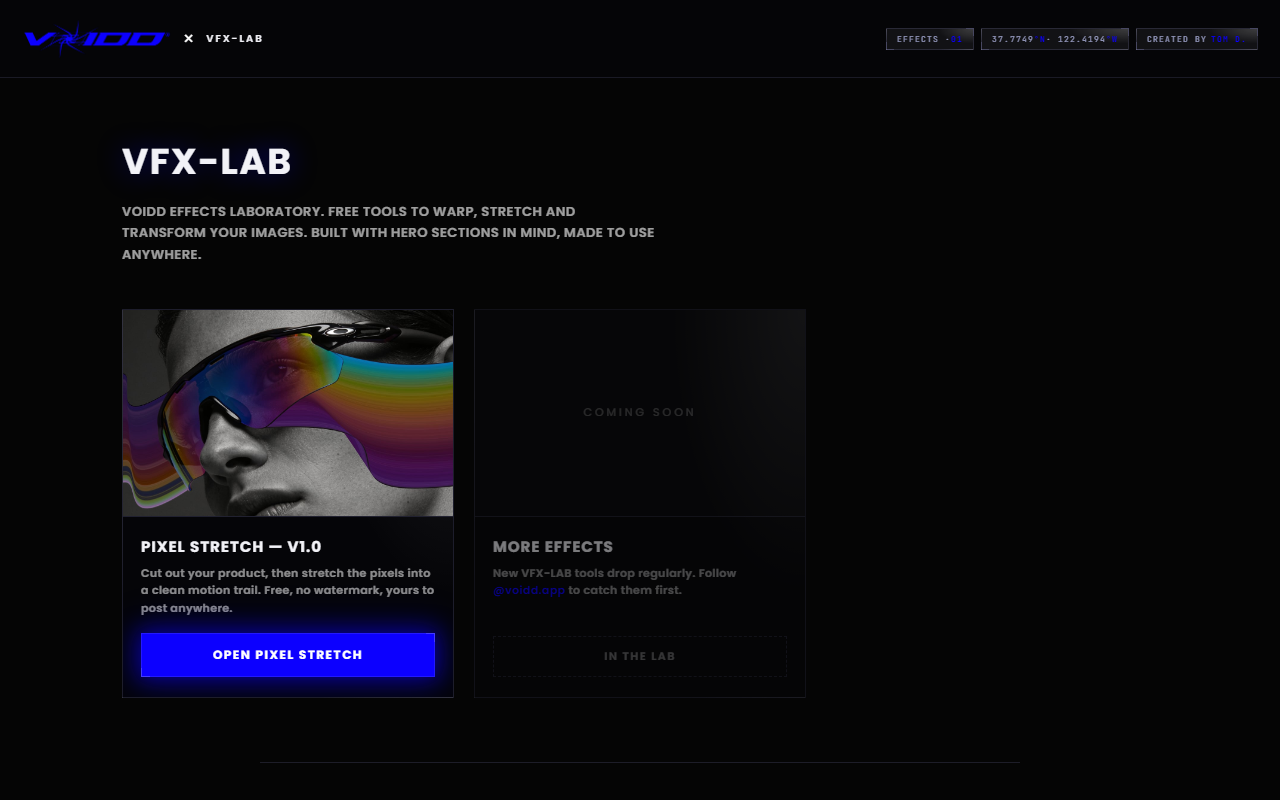
Free VFX software does not have to mean a 2GB download, a student license, or a watermark stamped over your work. A newer class of tools runs the whole effect pipeline in your browser. VFX-LAB is one of them: open a tab, drop in an image, apply cinematic effects, export a clean full-resolution file. Nothing installs, nothing uploads, nothing costs money.
That is the short answer. The rest of this guide covers what browser VFX software can and cannot do, which effects are worth your time, and the traps that make most "free" tools not free at all.
What counts as free VFX software?
Free VFX software is any tool that produces visual effects without charging you at the point of export. The honest test has three parts: no watermark on the output, no resolution cap, and no trial clock. If any of those fail, the tool is a paid product with a demo mode, not free software.
The category splits into two families. Desktop suites like Blender or DaVinci Resolve are genuinely free and enormously capable, but they cost you in a different currency: gigabytes of download, a real GPU, and weeks of learning curve. Browser tools sit at the other end. They open instantly, run on whatever machine you have, and focus on one effect done well.
Which family you want depends on the job. If you are compositing explosions into video, learn Blender. If you want a still product photo to look like a frame from a film, a browser tool gets you there in minutes, and that is the job this guide covers.
Why run VFX software in the browser instead of downloading it?
Because for image effects, the browser removes every cost except the effect itself. No install, no updates, no GPU requirement, no account. Modern browser tools also process everything locally on your machine, so your images never touch a server. You trade away video compositing, which most product and social work never needed anyway.
There is a speed argument too, and it is not about render times. It is about the distance between wanting an effect and having it. A desktop suite puts a project file, an import dialog, and a node graph between you and a motion trail. A browser tool puts a drag-and-drop zone. When the whole task is one effect on one image, the shortest path wins.
The VFX-LAB tools exist because of that math. They were built by VOIDD, a Shopify section studio, as a free front door. The paid product is animated storefront sections, so the image tools have no reason to hold your export hostage. Full-resolution PNG out, no strings.
What effects can you actually make with browser VFX tools?
The high-value set for still images: motion trails that make a static product read as moving, background-aware subject selection, and proportional composition overlays that frame a shot the way a cinematographer would. Stacked together, these three take a phone photo to something that looks art-directed.
Notice what is not on the list. Particle simulations, green-screen keying, 3D tracking: those belong to video suites and are the wrong reason to open a browser tool. The honest scope of browser VFX is the single still image, treated with intent.
That scope covers more ground than it sounds. Ad creatives, hero images, collection thumbnails, social posts, album art, thumbnails for video itself. Most of what a small brand publishes is still images, and almost none of it gets any VFX treatment at all. Which is exactly why the treated ones stand out.
How do you add a motion trail without After Effects?
Open the free Pixel Stretch builder, drop in your photo, and one-click select the subject with the built-in AI. Drag a stretch layer opposite the implied movement and the smeared pixels read as speed while the product stays sharp. Export at full resolution. Total time: about two minutes. The motion trail effect tool guide covers trail length and direction, and if you want to see the same effect built by hand, the pixel stretch effect in Photoshop guide lays the desktop steps next to the browser ones.
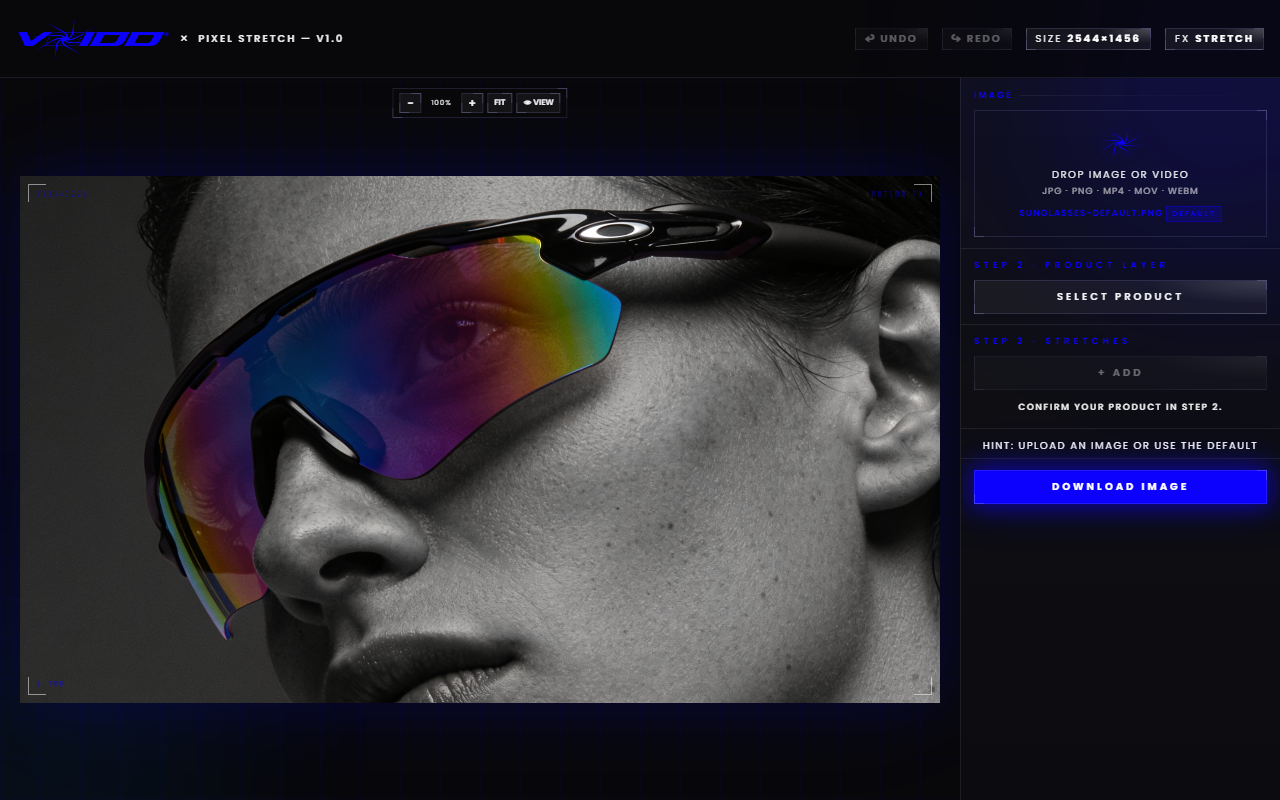
The effect borrows its logic from long-exposure photography. A sharp subject with a directional streak means motion; your eye learned that rule from thousands of photos of sprinters and taillights and applies it automatically. A few working rules keep it believable:
- Trail behind, never ahead. A leading streak reads as a smudge, not speed.
- Length sets velocity. A trail a third of the subject's width reads as drift. Double it and the object is plummeting.
- One hero effect per image. The most common failure in free-tool output is five effects fighting on one frame.
- Protect the detail. Keep trails away from faces, logos, and clasps on anything sold on craftsmanship.
Each stretch lives on its own layer and only the active layer responds to input, so tuning one trail never disturbs the rest of the image.
How do you compose a shot like a VFX artist?
Use a proportional overlay instead of guessing. The free Golden Ratio tool lays a fibonacci spiral and phi grid over your image so you can drag the crop until the focal point lands where a trained eye expects it. It takes thirty seconds and it is the difference between a centered catalog shot and a poster.
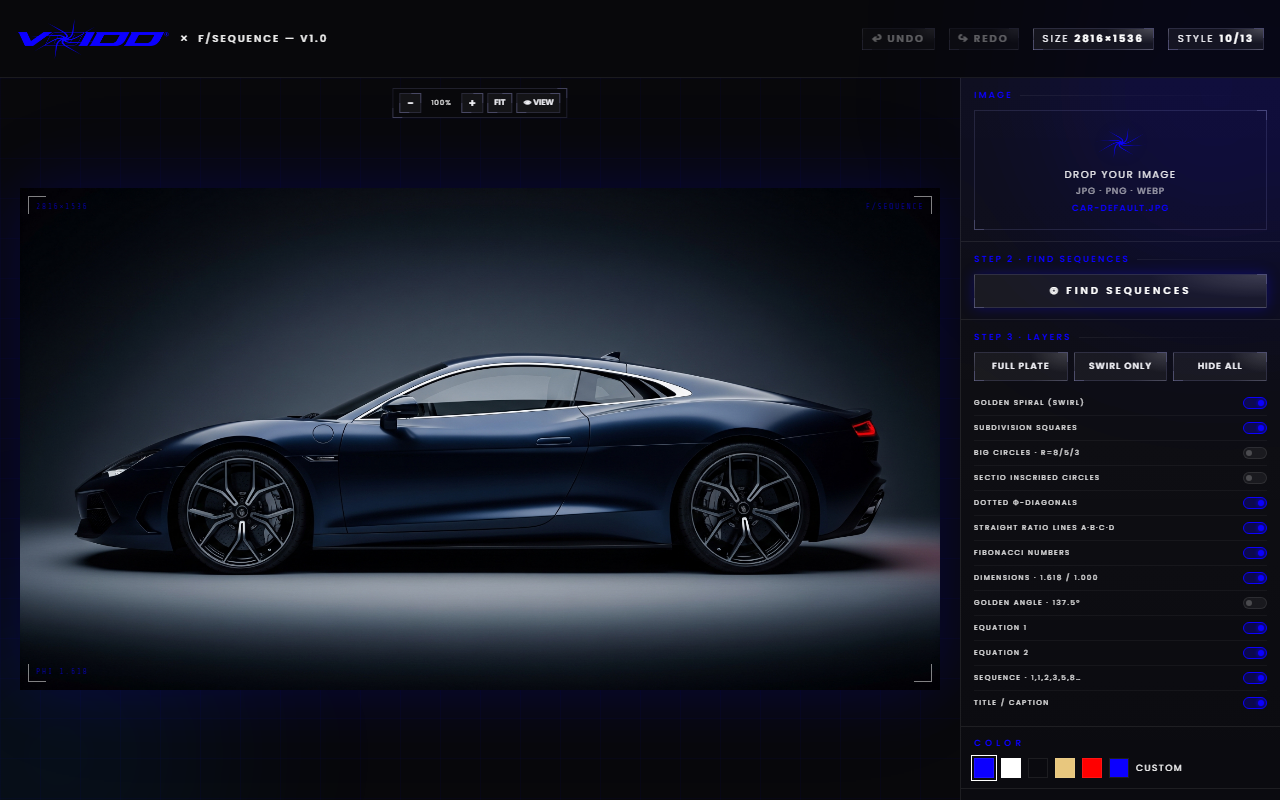
Composition is the most skipped step in amateur VFX because it does not feel like an effect. It is the effect. Films look like films before a single particle renders, because every frame is built on deliberate proportion and negative space. A motion trail flowing along a spiral into empty frame is cinema. The same trail on a dead-centered subject is a filter.
One habit makes this work: capture wider than you need. Recomposition is only free later if the pixels exist around the subject.
The catches to watch for in "free" VFX software
Most free tools charge you at the exit. The patterns repeat: a watermark across the corner, a resolution ceiling until you subscribe, an account wall before download, or your image quietly processed on someone's server. Run this checklist against any tool before you invest an afternoon in it:
- Watermark on export? Disqualifying for any professional use.
- Resolution capped? A 1080p ceiling ruins print, zoom views, and retina screens.
- Account required to download? Friction today, marketing email forever.
- Server-side processing? Your unreleased product shots now live on infrastructure you do not control.
- Upgrade nag mid-workflow? You will hit it on image nineteen of twenty.
The VFX-LAB tools pass all five checks: no watermark, full-resolution export, no signup, and all processing stays in your browser. The reason is structural. The studio behind them sells Shopify sections, so the free tools are marketing, not the revenue line.
What comes after the still image?
A treated image earns the click. What loads next decides whether the energy survives. The same studio behind these free tools builds animated Shopify hero sections where the VFX runs live on the page: the product floats in, lighting shifts, the scene reacts to the cursor. Browse them from the VOIDD home page.
The continuity logic is simple. If your ad creative implies motion and the store it links to opens on a static banner, the story breaks at the door. Merchants install the app, drop a section into the Shopify theme editor, and pick their products. No code, no render farm, no export step at all, because the effect is the page.
Treat the still and the storefront as two shots from the same film. Same palette, same mood, same implied motion. That continuity is what converts.
FAQ
Is there genuinely free VFX software with no watermark? Yes. The VFX-LAB free image effect tools export full-resolution PNGs with no watermark, no signup, and no trial period. The set includes a pixel-stretch motion trail builder and a golden-ratio composition tool, both aimed at product and social imagery. The free online VFX editor guide walks through each editor in the set.
Do browser VFX tools require a download or install? No. They run entirely in the browser tab and the processing happens on your machine, not a server. Open the page, drop in an image, apply the effect, download the result. Nothing installs and nothing is uploaded.
Can browser VFX software replace After Effects or Blender? For still-image effects, yes, and faster. For video compositing, particle work, or 3D tracking, no; those need a desktop suite. Most product photos, ads, and thumbnails only ever need the still-image half, which is exactly what browser tools cover.
What kind of computer do I need? Anything that runs a modern browser. Because the tools are single-purpose and work on one image at a time, there is no GPU requirement and no render queue. A mid-range laptop or a Chromebook handles them fine.
Can I get these effects as live animation on a Shopify store? Yes. VOIDD builds animated SupaHero Sections where the cinematic treatment runs live on the page instead of being baked into an image. Install the app, add a section in the theme editor, pick your products. Start at the VOIDD home page.